

08 Aug New Ticketing System – Password Reset Instructions
Great news: Les Délices has a new ticketing platform! This change means a smoother, more convenient purchasing process for you *and* no ticket fees!
If you have ever previously purchased tickets to a LD concert or made a donation to Les Délices, our team has already set up an account for you in our new system (Upstage), including your contact info and purchase and donation history. Before Season Subscriptions go on sale August 15th, please take a minute to set a password for your account (step-by-step instructions are below.) Once you have set your password, you will be able to purchase tickets, view past orders, make donations, and access your tickets all in one convenient place.
We understand that new systems can sometimes come with questions, and we’re here to help! If you encounter any issues following the steps below or have questions about your new account, please don’t hesitate to reach out to LD’s Box Office Coordinator Nicole Rossa at nicole@lesdelices.org or by calling and leaving a message at 216-302-8404.
CLICK HERE TO SET YOUR ACCOUNT PASSWORD WITH UPSTAGE
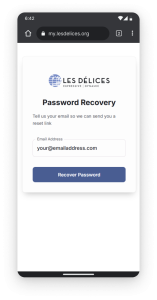
STEP ONE:
Visit the password recovery page and enter the same email address we used to send you this message then select the “Recover Password” button.
You will be automatically redirected to a confirmation page with information about an email with a link to reset your password then sign in.
Please be aware that the email will be sent from aws@upstagecrm.io, this is our new ticketing provider. Kindly add this email address to your contacts and, in case the confirmation email doesn’t appear, check your spam folder.
STEP TWO:
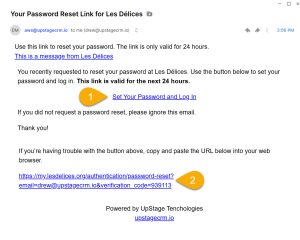
2. You may also copy and paste the URL at the bottom of the message to initiate the password reset process.
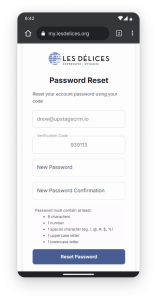
STEP THREE:
- For convenience, your email address and verification code will be prefilled for you. There’s no need to enter anything in either field.
- Set your password then enter again in the confirmation field.
Password must contain at least:
- 8 characters
- 1 number
- 1 special character (eg. !, @, #, $)
- 1 uppercase letter
- 1 lowercase letter
- Select the “Reset Password” button
You will be automatically directed to the Sign In page.
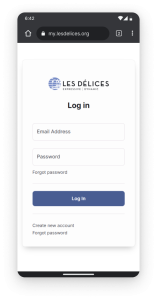 STEP FOUR:
Use your email address and new password to sign into your account.
Congrats! Your account is now accessible. On August 15th, you’ll be able to purchase season subscriptions for Les Délices 2025-26 season!